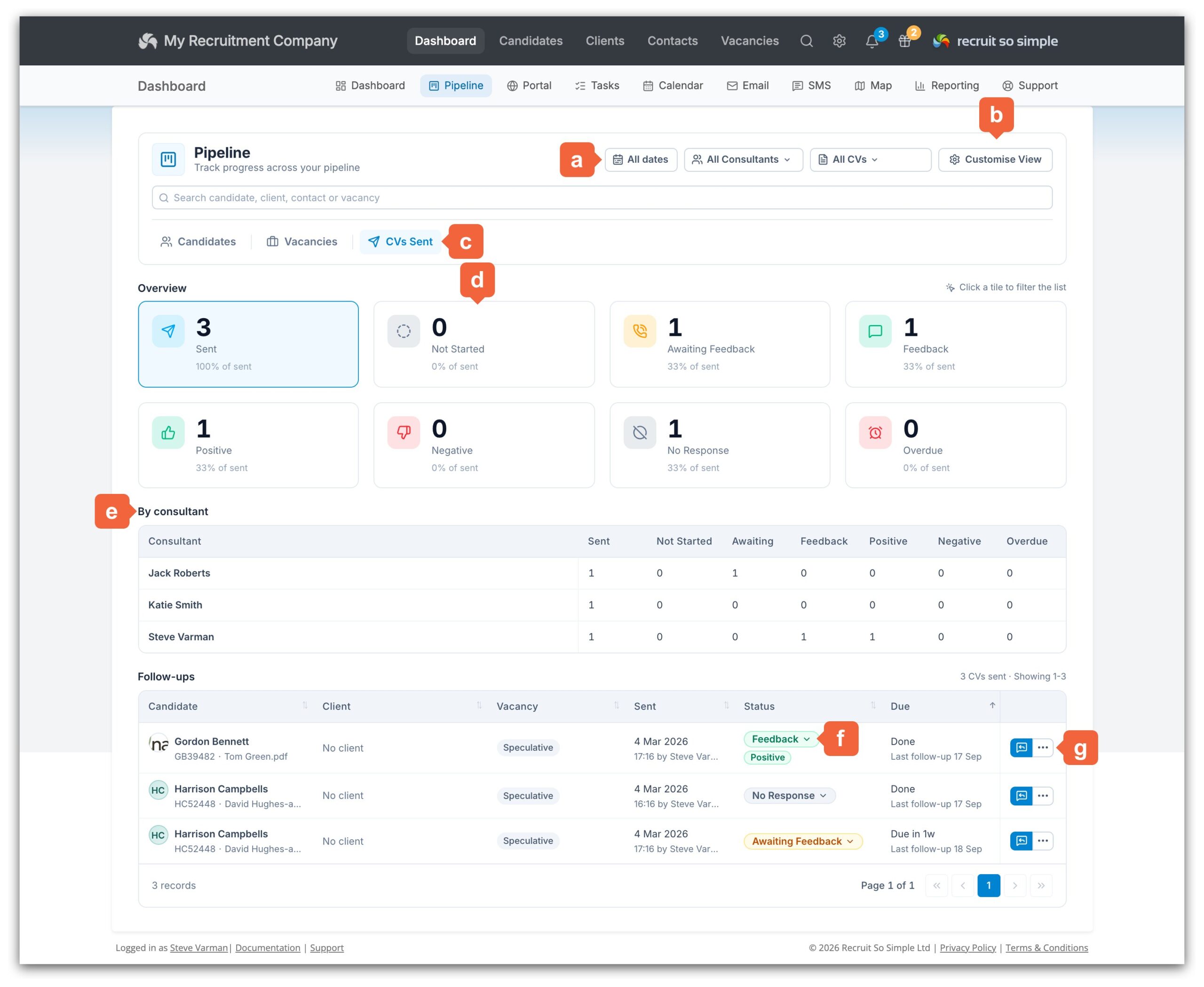
CVs Sent: follow up every CV for feedback
Sending a CV is only half the job. The new CVs Sent page in Dashboard > Pipeline tracks every CV you send to a client and helps you follow it up for feedback, so no CV is forgotten and every client hears back from you.
Every CV you email from a candidate’s record appears on the page automatically. Each one has a status (Not Started, Awaiting Feedback, Feedback or No Response) and a follow-up due date, so you can see at a glance which CVs need attention today.
Features
- See every CV sent, with the candidate, client, contact, vacancy, who sent it and when.
- Overview tiles and a By consultant breakdown show how many CVs are awaiting feedback, overdue, or have positive or negative feedback. Click a tile to filter the list.
- Log a follow-up in one click, recording the status, the medium and an optional journal entry with @mentions for your colleagues.
- Or follow up by email: the composer opens ready to go and sending the email logs the follow-up for you.
- Set a next follow-up date, view the full history, or reassign a CV to a colleague.
- Filter by sent date, consultant or team, and vacancy or speculative CVs. Sort by any column and set your own default follow-up interval.
Access is controlled by two new permissions in [Settings > System Settings > Permissions]: View CVs Sent and View All Consultants’ CVs Sent.
Read the full guide: CVs Sent (Dashboard).