
We’ve improved the Candidates, Clients, Contacts and Vacancies grids so that changes are now remembered automatically.
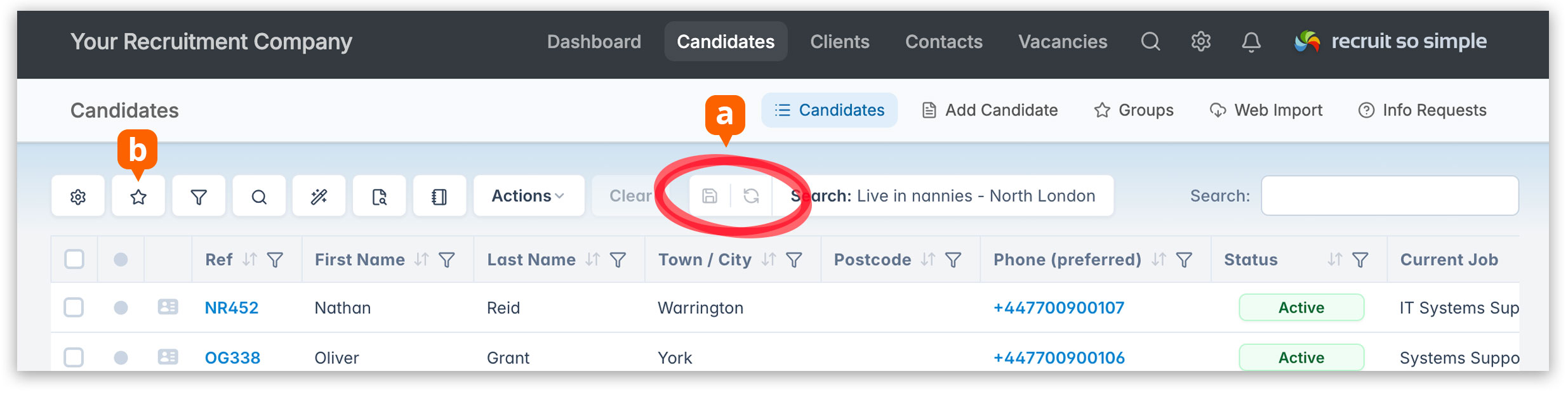
Previously, if you added, removed or reordered columns, changed sorting, applied filters, adjusted search criteria, or customised the grid in any way, those changes would be lost when you navigated away from the grid unless you saved them as a search.
Now, you can make changes, open records, move around the system, and return to the grid exactly as you left it.
A few things to note
- Temporary grid changes are remembered until you log out or are automatically logged out (this happens after 2 hours of inactivity).
- When you next log in, your default grid will be loaded (or the system default if you haven’t set one).
- If you’re working from your custom default or a saved search, and you make changes, you’ll have the option [a] to either:
- Update the saved search with your changes.
- Reset the grid back to the original saved search settings.
To save the current grid as a new search, click Searches [b] from the toolbar and choose Create New.
This update makes it much easier to perform one-off tasks without having to create additional saved searches just to preserve temporary changes.