
Settings > System Settings > Fees
Fees that you set here are applied globally to all subsequently added clients and vacancies. The rates for clients and vacancies that already exist on the system won’t be affected. This allows you to set a new rate for new clients going forward, while leaving existing agreements unaffected.
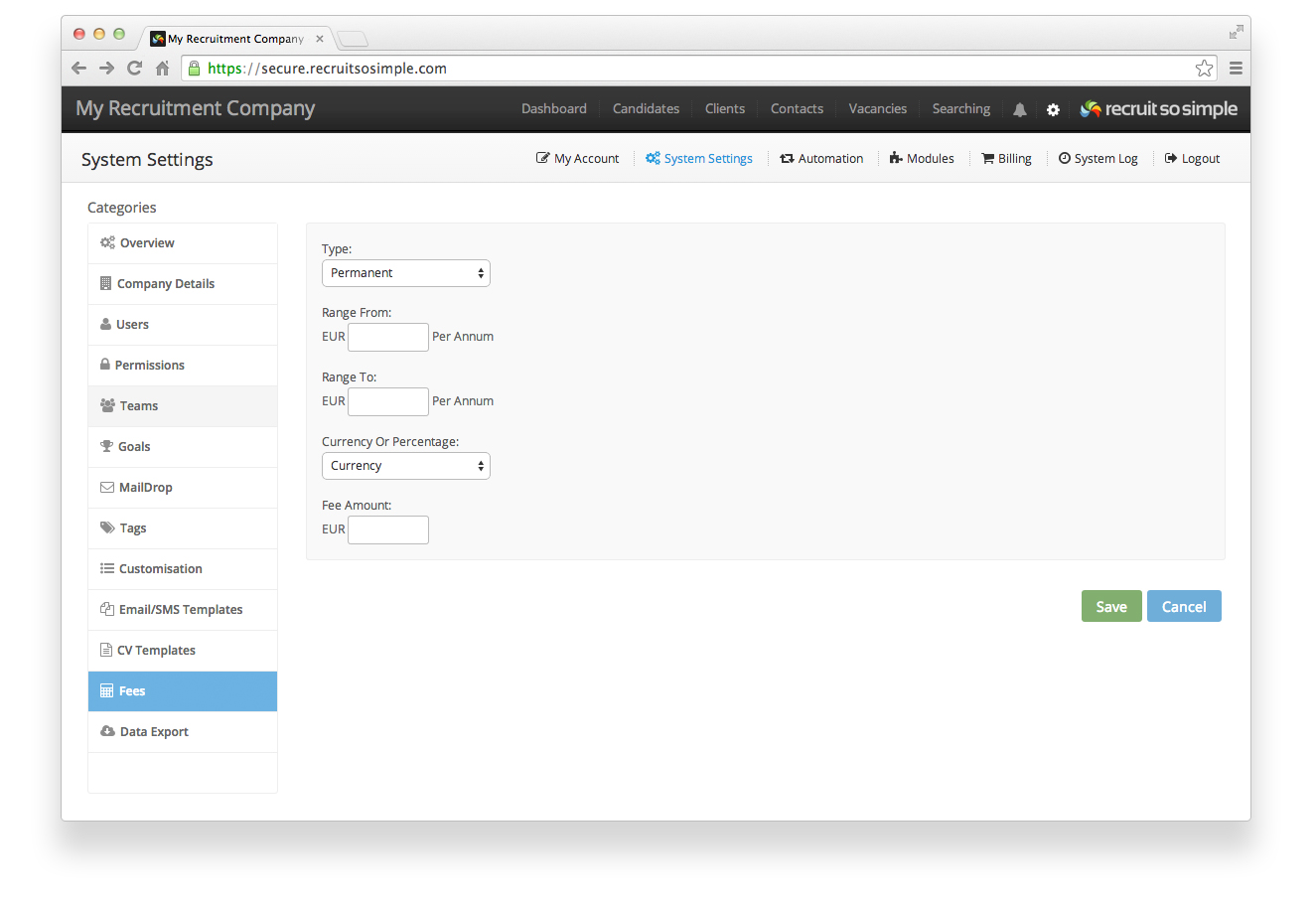
The system will calculate your fees based upon the following settings:
- Type You can setup different fees based upon temporary or permanent placements.
- Range Fees can be set based upon different salary ranges.
- Currency or percentage
- Amount
Adjusting fees per client: You can do this from a client’s ‘Details’ page. Scroll down and you’ll see the fees will be pre-filled with those entered under System Settings. Fee’s edited in the client’s details page will only affect this particular client.
Adjusting fees per vacancy: You can do this from a vacancy’s ‘Details’ page. When you edit fees from this page they will only be applied to this particular vacancy. You won’t see a fees option when adding a new vacancy, however when your new vacancy has been created you can then go to its ‘Details’ page and update the fees there.
How revenue is calculated with percentage fees
Permanent Positions
For permanent positions, the salary is converted into an annual amount. A percentage fee is then calculated based on one year’s salary to determine the revenue.
| Salary period | Formula to Convert to Annual Salary |
| Per hour | Hourly rate × 8 (hours per day) × 260 (working days per year) |
| Per Day | Daily rate × 260 (working days per year) |
| Per Week | Weekly rate × 52 (weeks per year) |
| Per Month | Monthly rate × 12 (months per year) |
| Per Annum | Annual salary (already given) |
Contract Positions
For contract positions, the salary is first converted into an hourly rate. This is then multiplied by the total contract duration. The calculation assumes:
- 8-hour work days
- 5-day work weeks
- 260 working days per year (or an average of 21.66 working days per month)
Note: Work Hours found on the vacancy record’s Details screen are not used in the calculation.
| Salary period | Formula to Convert to Hourly Rate |
| Per hour | Hourly rate (already given) |
| Per Day | Daily rate ÷ 8 (hours per day) |
| Per Week | Weekly rate ÷ 5 (days per week) ÷ 8 (hours per day) |
| Per Month | Monthly rate ÷ 21.66 (average working days per month) ÷ 8 (hours per day) |
| Per Annum | Annual rate ÷ 260 (working days per year) ÷ 8 (hours per day) |
This ensures salaries for both permanent and contract positions are standardized before applying a percentage fee.