
[Settings > System Settings > Job Titles]
This section allows you to manage all job titles stored in your database. A central pool of job titles is used across the system and powers the suggestions list when adding a job title in the following areas:
1. Candidate Required Jobs
Job titles added on a candidate record’s Employment screen as Required Jobs indicate roles the candidate is seeking or roles you believe they are suitable for. These Required Jobs are searchable on the Candidates grid.
2. Vacancy Job Titles
Job titles are also created when adding vacancies to your database. The vacancy job title is what clients and candidates will see when sharing your vacancy to your website, social media or job board.
3. Candidate Employment History
Job titles are also added from the candidate’s employment history – whether added manually or extracted via CV parsing. This includes the candidate’s Current Job, which is searchable on the Candidates grid.
Editing, Deleting and Merging Job Titles
Over time, duplicate job titles, spelling mistakes, and variations can accumulate, making it harder to maintain consistency and search effectively. You can clean and standardise your job titles using the following tools:
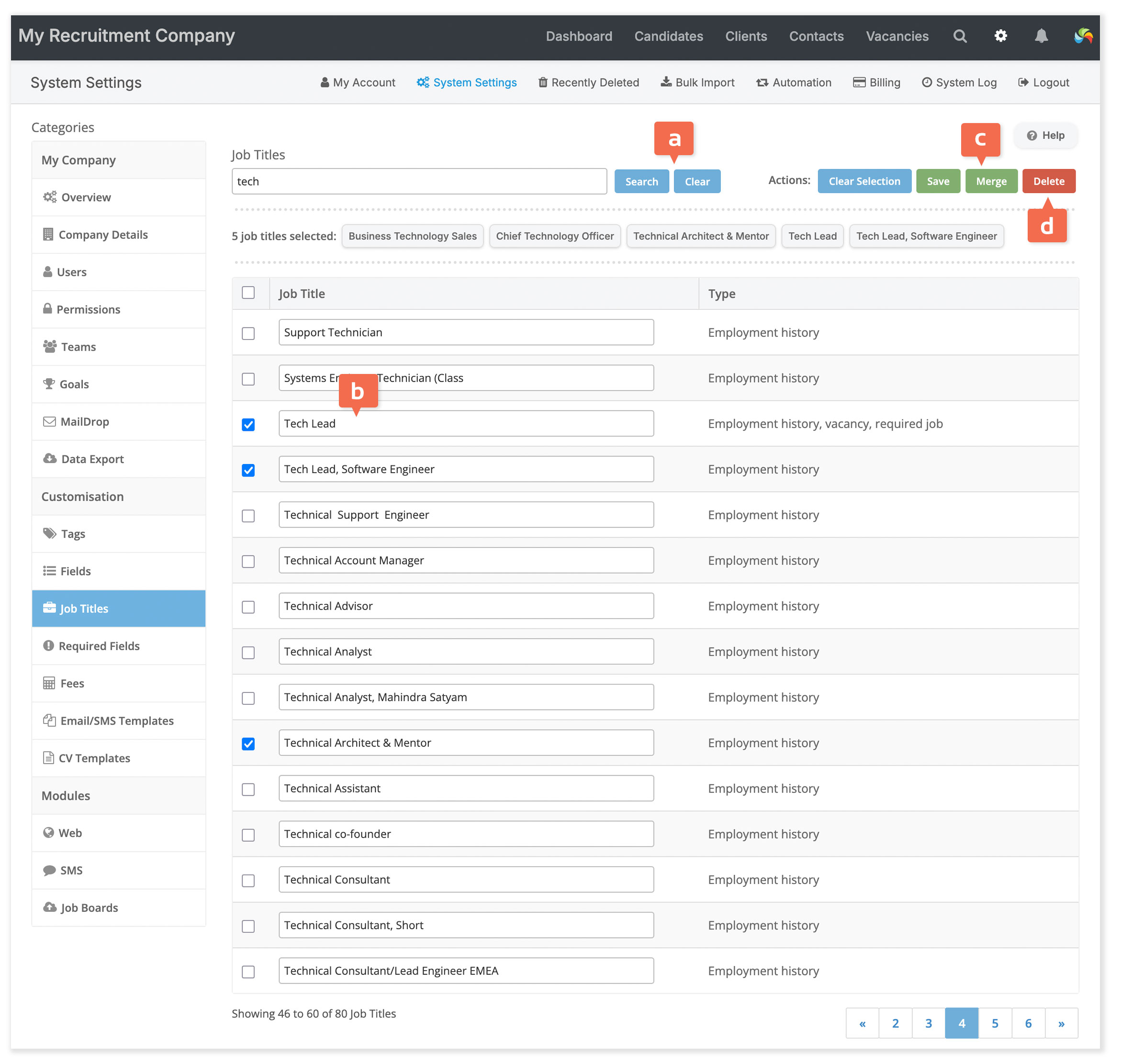
[a] Search Job Titles
Type part of a job title (e.g. tech) to see all matching entries, such as:
- Tech
- Senior Technician
- Technical Advisor
[b] Edit a Job Title
Click to edit a job title directly. Once you’ve made your changes, click Save. All instances of that job title – across Required Jobs, Vacancy Titles, and Employment History – will be updated automatically.
[c] Merge Job Titles
To consolidate duplicates or variants:
- Select the titles you want to merge (e.g. Nurse, Nursing, Nrusing).
- Click the Merge button.
- Enter the preferred job title. You can choose one of the selected titles (e.g. Nurse) or a new one (e.g. Healthcare Professional).
All instances across Required Jobs, Vacancy Titles, and Employment History will be updated to reflect the new title.
[d] Delete a Job Title
You can delete selected job titles only if they are:
- Not currently used in any vacancy, or
- Not listed in any candidate’s employment history
Deleting a job title will remove it from the Required Jobs list on all candidate records.
Flexible selecting and searching
You can select and edit job titles across multiple pages. Your selections are preserved when you clear the search box or perform a new search, allowing you to continue building your selection without losing any previously selected titles.