
[Magnifying glass (main menu) > Custom]
Note: This is our legacy search
The searching functionality inside Recruit So Simple gives you the ability to find the records you need quickly and efficiently, using a wide variety of tools and options. To begin, first select the type of records you want to search for and then build up your search query using any of the available options. You can use the Keyword, CV and Additional options together, or separately on their own – the choice is yours. However, all of the criteria entered must match to enable a result.
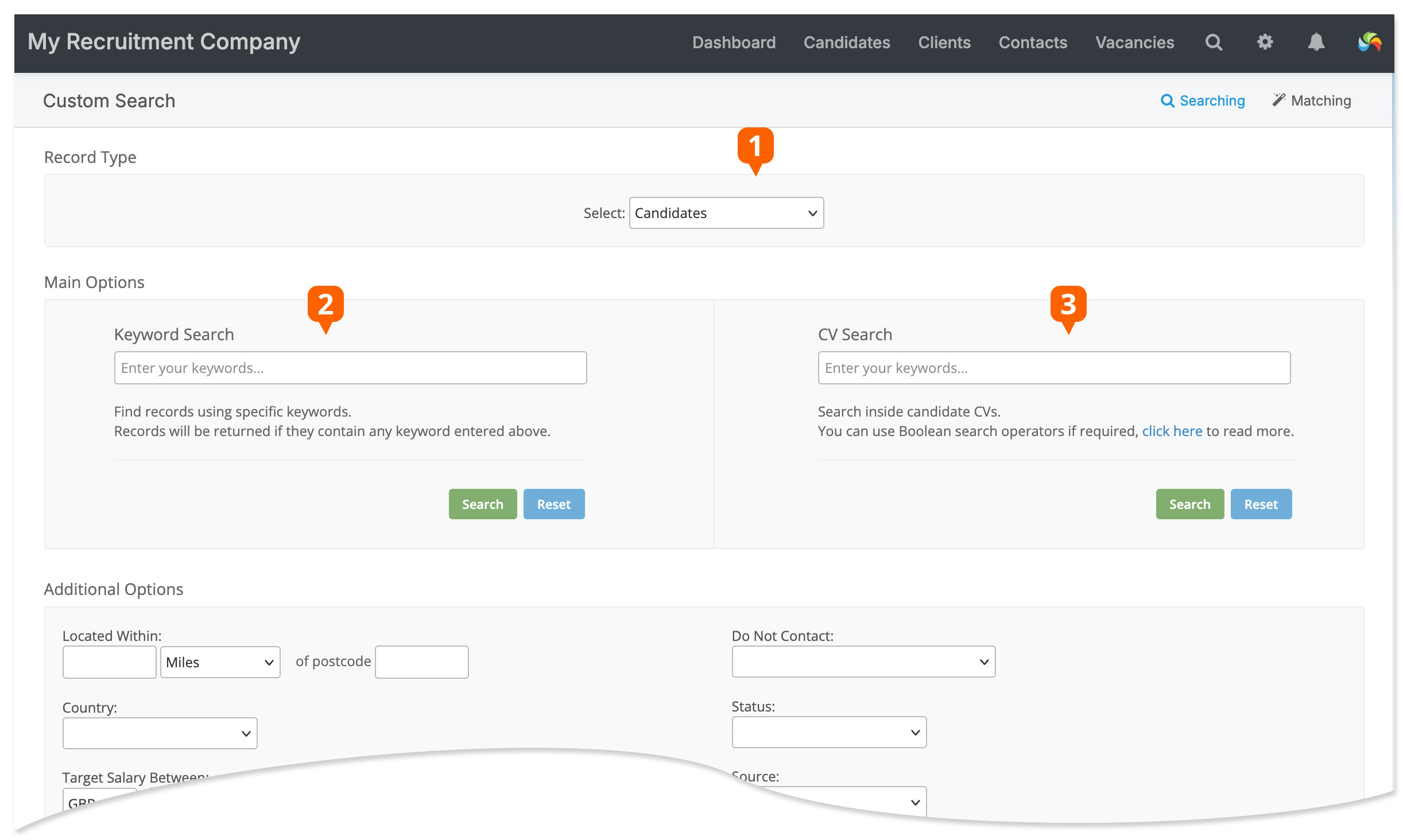
- Select the type of record you want to search
- Keyword search
- CV text search
Keyword Search
The Keyword Search option will look for your chosen keywords inside most of the fields inside Recruit So Simple, including address information, current job and notes. The query must be at least 3 characters long (excluding spaces) and every keyword entered must be found inside the record for it to be displayed as a result.
The keyword search doesn’t support full Boolean searching (the CV Search does). However, you can enter more than one word separated by spaces, for example:
Portsmouth Southampton Plymouth
Will find records with any of the above in their address information.
CV Search
The CV Search option allows you to search for text inside candidate CVs. You can use Boolean queries in this search. If no Boolean operator is specified then the default behaviour will be “AND”, i.e. all of the words must exist (see below). CV searching is case insensitive, it will also consider most accented characters equivalent to the non-accented character (e.g. E, e and é are equivalent).
Only letters, numbers, and the chatacters + and # can be searched on, any other characters will be ignored.
Each candidate can only have one searchable CV. You can choose which one under the candidate’s Docs screen.
Here are some examples of CV search queries:
John Smith Sales
Will find CVs that contain ALL of the 3 words.
“John Smith” sales
Will find CVs that contain the exact phrase “John Smith” AND the word “sales”.
“Sales manager” OR “Sales director”
Will find CVs that contain EITHER of the exact phrases.
“Sales manager” –London
Will find CVs that contain the exact phrase “Sales manager” but do NOT contain “London”.
(”Sales manager” Manchester) OR (”Sales director” London)
You can use brackets to group queries. In this example, it will find CVs that contain the exact phrase “Sales manager” AND the word “Manchester”, OR CVs that contain the exact phrase “Sales director” AND the word “London”.
Note that you can use the pipe character | as an alternative to the OR operator.