
Introduction
Candidate Matching helps you quickly find the most relevant candidates for a vacancy. Not just a generic AI search of your candidate CVs, it reads the vacancy details, extracts the key requirements, then searches candidate records for matching job titles, desired roles, CV skills, experience, qualifications, education, and previous roles.
The system produces a match score out of 100. This score combines AI relevance scoring with practical checks such as salary expectations, work type, location, industry, experience, and how recently the candidate record was updated. These checks can be included or excluded from Matching Settings if you want to broaden or narrow the results.
Each result includes a short explanation showing why the candidate may be a good fit, including strengths and any considerations. Candidates already on the vacancy pipeline, archived candidates, deleted records, and very weak matches are excluded from the main results.
Results are cached for speed, but you can re-match candidates at any time to refresh the shortlist.
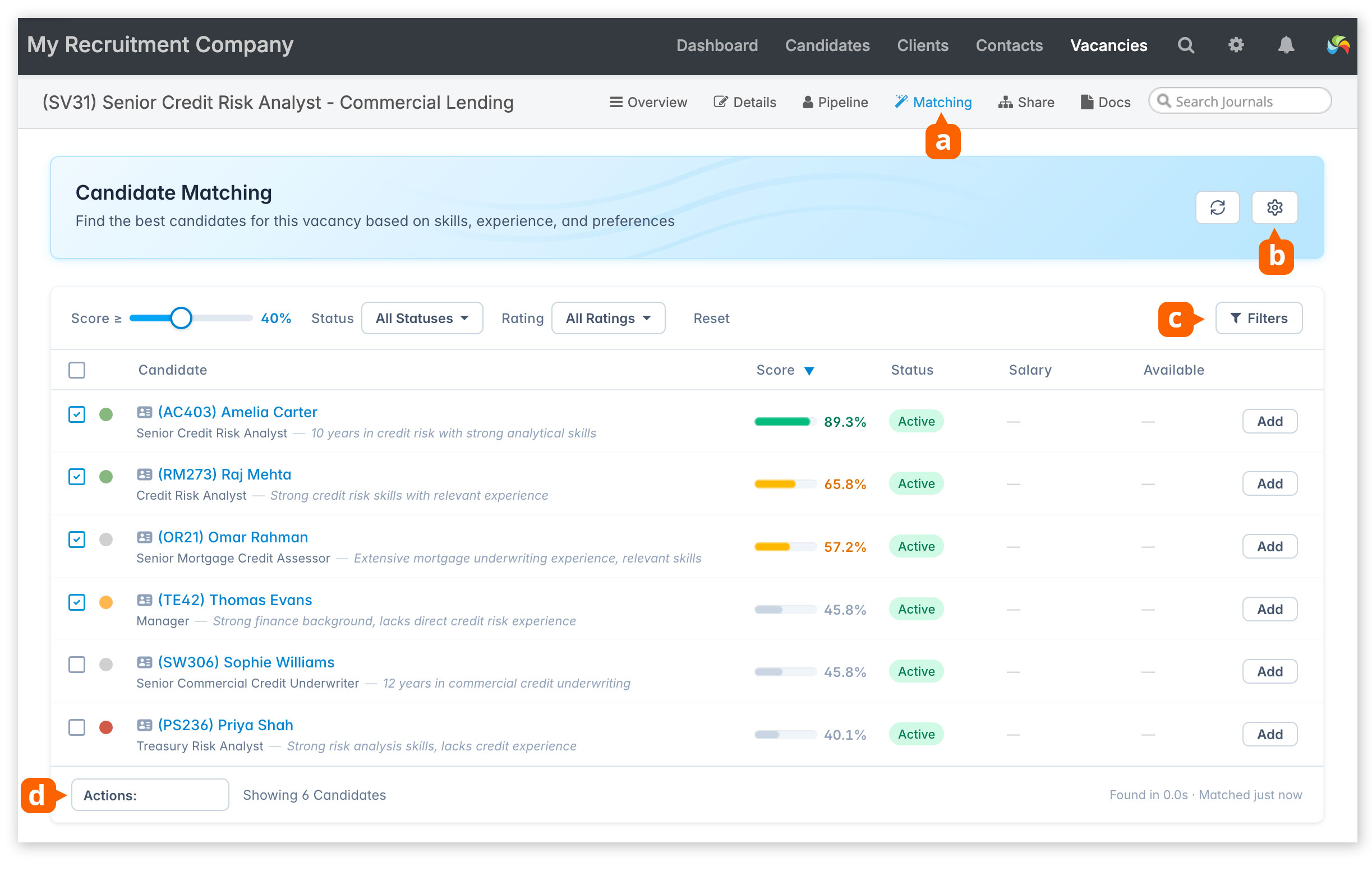
On a vacancy record, click Matching [a] to initiate a search.
Matching Settings [b] allows you to customise the matching calculation by including or excluding:
- Industry (see below)
- Location
- Salary (candidate target salary)
- Work Type (candidate preference for full-time, part-time, perm and/or contract)
- Experience (Candidate employment history)
Results can be further filtered [c] by tag(s), candidate job title, minimum salary, when the candidate record was last updated and availability.
Results can also be filtered by candidate status and vacancy ranking (traffic light).
Use the score slider to widen or narrow the results shown.
To add a candidate to the vacancy, click the Add button.
Select records, and apply bulk actions [d].
Industry is available as a column in the vacancy and candidate grids.
Seniority
Candidate record: Employment History
Seniority levels are fixed (Junior, Mid-level, Senior, Leadership, Executive), and applied automatically for each position in a candidate’s employment history. You can review and change seniority if needed.
Seniority is not industry-specific, so just apply the level that best fits your particular sector.
Highlights
Candidate record: Employment History
Highlights are AI-generated summaries for each position on a candidate’s employment history. These can be reviewed and edited by editing the employment history entry.
Industry
Industry is assigned to both candidates and vacancies, and is used as part of the matching algorithm. It is intended as a broad classification to help improve matching accuracy, rather than as an exhaustive list of sectors.
Industry is available as a column on the Candidates and Vacancies grids, allowing you to sort and filter records by industry.
Industry is assigned automatically (see below), but can also be changed manually on:
- Candidate record: Details screen
- Vacancy record: Details screen
Industry is assigned automatically in the following situations:
- Parsing a CV in [Candidates > Add Candidate]
- Bulk importing candidates (either from a CSV file or a ZIP file containing original CVs)
- Forwarding a CV into your database using the MailDrop feature
- Adding a candidate from [Candidates > Web Import]
- Adding a vacancy by parsing a job description, or by pasting job description text into [Vacancies > Add Vacancy]
- Manually entering text into the vacancy’s Job Description (Private) field on the Details screen. NOte that sufficient text will need to be added for a more accurate result.
If preferred, Industry can be excluded from the matching criteria in the Matching settings.
The available industries are intentionally broad. If selecting manually, choose the option that best suites the candidate’s or vacancy’s primary sector.
Note: is not possible to add your own industry sectors.
| A to F | H to N | P to Z |
| Aerospace & Defence | Healthcare | Professional Services |
| Agriculture & Food | Hospitality | Public Sector |
| Automotive | Legal | Real Estate |
| Construction | Life Sciences | Recruitment |
| Consumer Goods | Logistics | Retail |
| Education | Manufacturing | Technology |
| Energy & Utilities | Marketing & Advertising | Telecommunications |
| Financial Services | Media & Entertainment | Travel & Leisure |
| Non-Profit |