
[Vacancy > Share]
Post your vacancy to your website, job board aggregator, Indeed or micro Job Board
Before we explore the available sharing options, it’s worth explaining the two ways you can integrate your existing website with Recruit So Simple:
- Website Integration Module
The Website Integration Module is our quick and simple method for connecting Recruit So Simple to your website. It’s often the best choice if you use WordPress or manage your website yourself, as it requires minimal technical setup. - Developer Integration using our Data Feeds
If you work with a web developer, they can integrate your website using our Data Feed API and Data Posting API. This approach gives your developer complete control over how job listings are styled and displayed on your site.
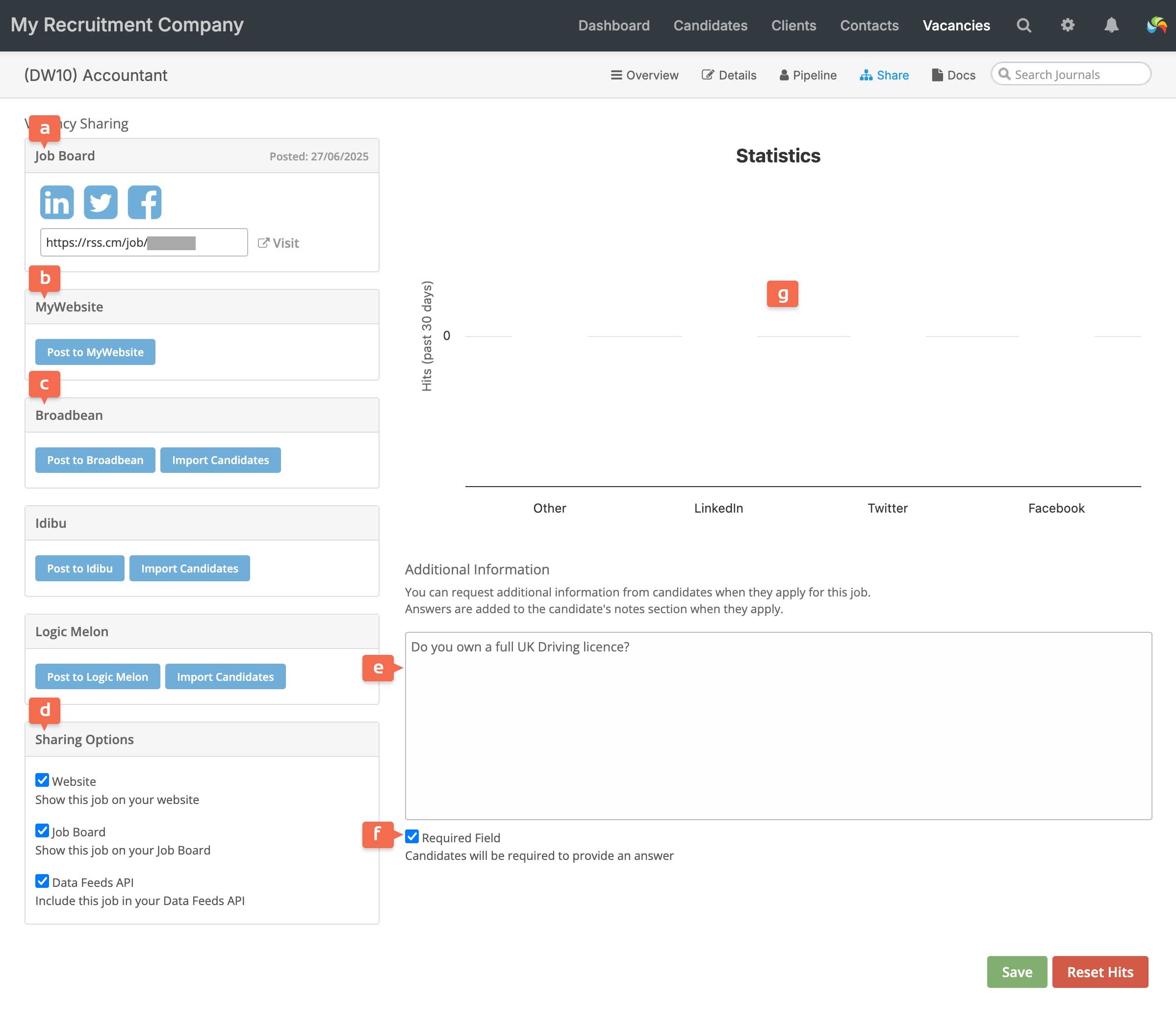
Sharing Options [d]
Website
Displays the vacancy in the Website Integration module.
Job Board
The micro Job Board is included as standard. It’s a one-page website that’s ideal for sharing vacancies on your social media, email and marketing – shared jobs are also made available for Google Jobs to index! You can find how to set up your Job Board here.
Enabling the Job Board option triggers several events:
- Adds the vacancy to your micro Job Board.
- If you have integrated RSS with your Indeed account, this will post the vacancy on Indeed.
- Reveals the Vacancy Sharing [a] options, allowing you to:
- Share the vacancy directly to LinkedIn, X (formerly Twitter), and Facebook.
- Use the short URL to promote the vacancy via other social media, your website, or email campaigns. This links to the vacancy on your micro Job Board, where candidates can view and apply.
Data Posting API
Adds the vacancy to your JSON and XML feeds – for when using developer website integration (see introduction at the top of the page).
Removing a vacancy from feeds
To remove a vacancy from any feed, simply deselect the relevant sharing option. Closed vacancies are automatically removed from all feeds.
MyWebsite [b]
If you’re using our website service, this option allows you to publish or remove vacancies from your website.
Job Board Aggregators [c]
If you have an account with Broadbean, Idibu, or Logic Melon, you can integrate it with Recruit So Simple. This allows you to:
- Post vacancies directly from within the CRM.
- Download candidate applications.
Additional Information [e]
When integrating Recruit So Simple with your website, you can include a custom application question.
This appears as a text box in the application form on your website, and you can choose to make the question mandatory or optional [f].
Statistics [g]
The system tracks which social media platforms generate the most traffic to your vacancies. Traffic from search engines or other sources will be grouped under “Other”.