
Introduction
This document aims to highlight some of the key themes contained within the GDPR (General Data Protection Regulation) and how Recruit So Simple can help you stay compliant. The information below is for your reference only and should not be taken as legal advice. Further information can be found on the ICO’s website: https://ico.org.uk/for-organisations/data-protection-reform/overview-of-the-gdpr/
Lawful Basis
You must first determine your lawful basis before you begin processing personal data. There are six available lawful bases for processing: consent, contract, legal obligation, vital interests, public task, and finally, legitimate interests.
No single basis is ’better’ or more important than the others – which basis is most appropriate to use will depend on your purpose and relationship with the individual. For example, your legal basis for your clients might be ‘contract’, however, ‘legitimate interest’ or ‘consent’ might be more suitable for candidates.
The ICO has a really helpful tool which is designed to assist businesses in determining which lawful basis is appropriate for their data processing activities.
Once you have decided on the correct lawful basis you should document it, and then update your privacy policy to explain your lawful basis along with the purposes of the processing.
Documenting Evidence
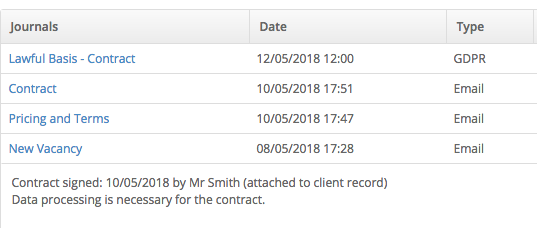
You can record the lawful basis (and the justification) by adding a journal to the relevant record in the system. Alternatively, you may decide that simply using the notes field is sufficient for your needs. It is your responsibility to ensure that you can demonstrate which lawful basis applies to the particular processing purpose.
Custom Journal Types
You may want to add a custom journal type (for example, ‘GDPR’) to help better organise your database. You will then be able to search your entire database for records that are missing the ‘GDPR’ journal type. This makes your on-going compliance a little easier to manage. Custom journal types can be added under [System Settings > Fields > Journal Types]
Locking Journals
If required, you can prevent users from editing and deleting journals once they have been created. You can edit user permissions under [System Settings > Permissions]
Sent Document History
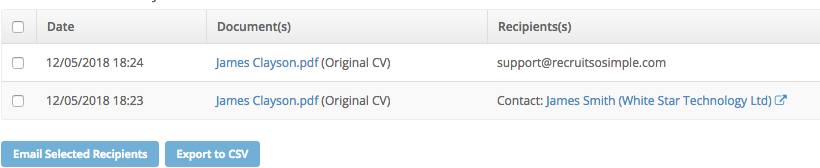
The system automatically keeps a record of every document which has been sent from the system, including when and who it was sent to. Just click the ‘View Sent History’ button in the bottom-left of the Docs screen inside any record. This information will be useful If you receive a subject access request from a data subject.
Info Requests
You can use info requests to send a simple, yet fully customisable, positive opt-in/out email to your candidates. Candidates respond by clicking one of two buttons inside of the email, which then triggers a set of automated actions inside Recruit So Simple in real time. For example, it could be used for re-confirming or withdrawing consent. One of the buttons could add the custom ‘GDPR’ journal type (as discussed above), and the other could set them as “Do Not Contact”.
You should always ensure that you have a lawful basis before sending an info requests to a candidate. You can add info requests under [Candidates > Info Requests]
Individual Rights
Right to Erasure
The right to erasure is also known as ‘the right to be forgotten’.
To ensure compliance, when records are deleted in Recruit So Simple – all data is permanently removed from our servers (inc documents, notes and journals etc). The only information that remains is an entry in your system log, which is required to keep an accurate audit trail.
Right of Access
This is commonly referred to as ‘subject access request’.
Should you receive a subject access request, it’s possible to export all of your data from Recruit So Simple in CSV format (along with any documents). You can then consolidate the information into a nicely formatted PDF for example, and then email it to the requester.
Further Information
For information about our security, infrastructure, and data backup polices etc – please refer to the GDPR section on our main website. If you have any specific questions or concerns, feel free to open a support ticket and we’ll be happy to help.